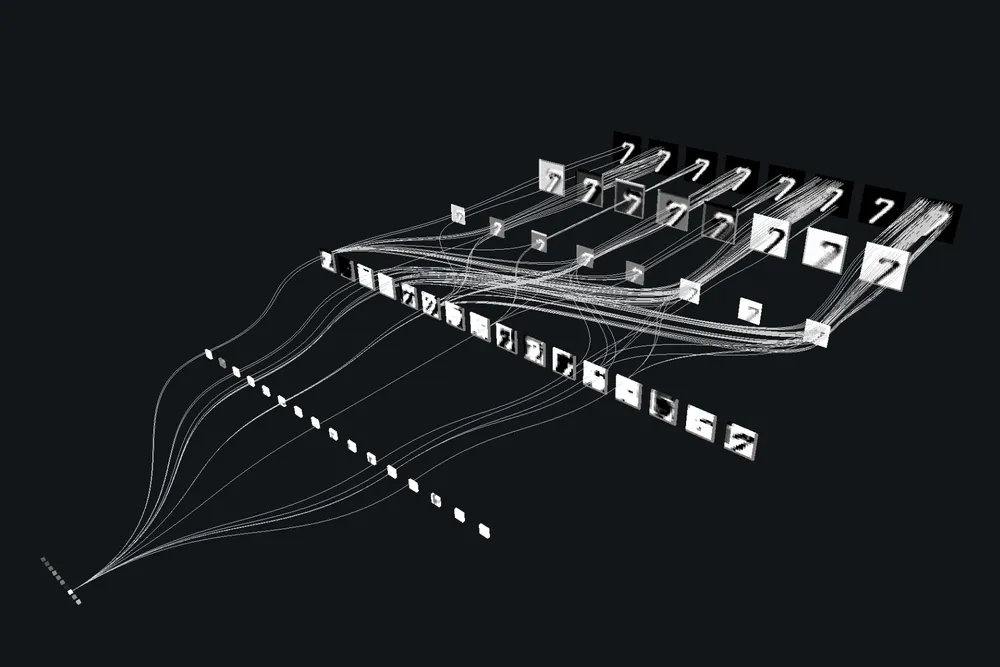

I wanted to learn PyTorch so here is a project that uses PyTorch to build Convolutional Neural Network (CNN) model that can classify digits on a canvas. Here is the final product: https://cnn.mohammedx.tech/
Requirements
pip install numpy matplotlib tensorflow scikit-learn streamlit streamlit-drawable-canvas pillow pandasDon't forget to use a virtual env.
from numpy import mean, std
from matplotlib import pyplot as plt
from sklearn.model_selection import KFold
from tensorflow.keras.datasets import mnist
from tensorflow.keras.utils import to_categorical
from tensorflow.keras.models import Sequential
from tensorflow.keras.layers import Conv2D, MaxPooling2D, Dense, Flatten
from tensorflow.keras.optimizers import SGD

def load_dataset():
    (trainX, trainY), (testX, testY) = mnist.load_data()
    trainX = trainX.reshape((trainX.shape[0], 28, 28, 1))
    testX = testX.reshape((testX.shape[0], 28, 28, 1))
    trainY = to_categorical(trainY)
    testY = to_categorical(testY)
    return trainX, trainY, testX, testY

def prep_pixels(train, test):
    train_norm = train.astype('float32') / 255.0
    test_norm = test.astype('float32') / 255.0
    return train_norm, test_norm

def define_model():
    model = Sequential()
    model.add(Conv2D(32, (3, 3), activation='relu', kernel_initializer='he_uniform', input_shape=(28, 28, 1)))
    model.add(MaxPooling2D((2, 2)))
    model.add(Flatten())
    model.add(Dense(100, activation='relu', kernel_initializer='he_uniform'))
    model.add(Dense(10, activation='softmax'))
    opt = SGD(learning_rate=0.01, momentum=0.9)
    model.compile(optimizer=opt, loss='categorical_crossentropy', metrics=['accuracy'])
    return model

def evaluate_model(dataX, dataY, n_folds=5):
    scores, histories = list(), list()
    kfold = KFold(n_folds, shuffle=True, random_state=1)
    for train_ix, test_ix in kfold.split(dataX):
        model = define_model()
        trainX, trainY = dataX[train_ix], dataY[train_ix]
        testX, testY = dataX[test_ix], dataY[test_ix]
        history = model.fit(trainX, trainY, epochs=10, batch_size=32, validation_data=(testX, testY), verbose=0)
        _, acc = model.evaluate(testX, testY, verbose=0)
        print('> %.3f' % (acc * 100.0))
        scores.append(acc)
        histories.append(history)
    return scores, histories

def summarize_diagnostics(histories):
    for i in range(len(histories)):
        plt.subplot(2, 1, 1)
        plt.title('Cross Entropy Loss')
        plt.plot(histories[i].history['loss'], color='blue')
        plt.plot(histories[i].history['val_loss'], color='orange')
        plt.subplot(2, 1, 2)
        plt.title('Classification Accuracy')
        plt.plot(histories[i].history['accuracy'], color='blue')
        plt.plot(histories[i].history['val_accuracy'], color='orange')
    plt.show()

def summarize_performance(scores):
    print('Accuracy: mean=%.3f std=%.3f, n=%d' % (mean(scores)*100, std(scores)*100, len(scores)))
    plt.boxplot(scores)
    plt.show()

def run_test_harness():
    trainX, trainY, testX, testY = load_dataset()
    trainX, testX = prep_pixels(trainX, testX)
    scores, histories = evaluate_model(trainX, trainY)
    summarize_diagnostics(histories)
    summarize_performance(scores)

run_test_harness()
1- Data Loading and Preprocessing
load_dataset()
- Loads the MNIST dataset (handwritten digits 0–9).
- Applies one-hot encoding to labels for training.
prep_pixels(train, test)
- Converts images from
uint8tofloat32. - Normalizes pixel values from
[0, 255]to[0.0, 1.0].
define_model()
- Builds a simple CNN:
Conv2D: Detects patterns in images.MaxPooling2D: Reduces spatial dimensions.Flatten: Flattens 2D to 1D.Dense: Fully connected layers to classify digits.
- Compiles with
SGDoptimizer and categorical cross-entropy loss.
2- Evaluation with K-Fold Cross-Validation
evaluate_model(dataX, dataY, n_folds=5)
- Splits the training data into 5 folds.
- Trains and validates on different splits to reduce overfitting.
- Tracks accuracy and learning history.
summarize_diagnostics
- Good to visualize validation accuracy/loss
summarize_performance(scores)
- Displays average model accuracy and variation.
- Plots a boxplot of performance across folds.
3- Model Training and Saving
run_test_harness()
- Manages the full training and evaluation flow.
- Calls:
load_dataset()prep_pixels()evaluate_model()summarize_diagnostics()summarize_performance()
save_model()
- Trains the model once on all training data (outside cross-validation).
- Saves the trained model as
final_model.h5.
4- Making Predictions
import numpy as np
from tensorflow.keras.models import load_model
from tensorflow.keras.datasets import mnist

def classify_digit(image):
    model = load_model('final_model.h5')
    image = image.reshape(1, 28, 28, 1)
    image = image.astype('float32') / 255.0
    prediction = model.predict(image)
    return np.argmax(prediction, axis=1)[0]

(trainX, trainY), (testX, testY) = mnist.load_data()
sample_image = testX[0]
digit_class = classify_digit(sample_image)
print("Predicted class:", digit_class)
classify_digit(image)
- Loads the saved model.
- Accepts a
28x28grayscale image. - Normalizes and reshapes it.
- Predicts the digit using
argmaxof softmax probabilities.
4- Build the Front-End
import streamlit as st
from streamlit_drawable_canvas import st_canvas
from tensorflow.keras.models import load_model
import numpy as np
from PIL import Image
import pandas as pd

@st.cache_resource
def load_mnist_model():
    try:
        return load_model('final_model.h5')
    except Exception as e:
        st.error(f"Error loading model: {e}")
        return None

model = load_mnist_model()

st.title("MNIST Digit Classifier")
st.markdown("Draw a digit on the canvas below and see the model predict the digit!")

st.sidebar.header("Configuration")
b_color = st.sidebar.color_picker("Brush color", "#000000")
bg_color = st.sidebar.color_picker("Background color", "#FFFFFF")
drawing_mode = st.sidebar.checkbox("Drawing mode?", True)

canvas_result = st_canvas(
    stroke_width=20,
    stroke_color=b_color,
    background_color=bg_color,
    height=280,
    width=280,
    drawing_mode='freedraw' if drawing_mode else 'transform',
    key="canvas"
)

def preprocess_image(image_data):
    img = Image.fromarray(image_data.astype('uint8'), 'RGBA').convert('L')
    img = img.resize((28, 28))
    img = Image.eval(img, lambda x: 255 - x)
    img = np.array(img).astype('float32') / 255.0
    img = img.reshape(1, 28, 28, 1)
    return img

if model is not None and canvas_result.image_data is not None:
    img = preprocess_image(canvas_result.image_data)
    prediction = model.predict(img)
    pred_digit = np.argmax(prediction)
    probabilities = prediction[0]
    st.write(f"Predicted digit: **{pred_digit}**")
    prob_df = pd.DataFrame(probabilities, index=range(10), columns=["Probability"])
    st.bar_chart(prob_df)
else:
    st.write("Please draw a digit on the canvas.")
@st.cache_resource + load_mnist_model()
- Loads the trained model once using caching for performance.
st_canvas
- Canvas where the user can draw a digit.
preprocess_image(image_data)
- Converts canvas image to grayscale.
- Resizes to 28x28.
- Inverts pixel colors (white-on-black → black-on-white).
- Normalizes and reshapes to CNN input format.
Live Prediction and Visualization
- Once the user draws:
- The image is processed and passed to the model.
- Prediction is shown alongside a bar chart of probabilities (using
st.bar_chart()).
Run the App
streamlit run app.py